The Dashboard
KPIs, a net-sales chart, top products, recent orders, and quick actions on one frontend screen.
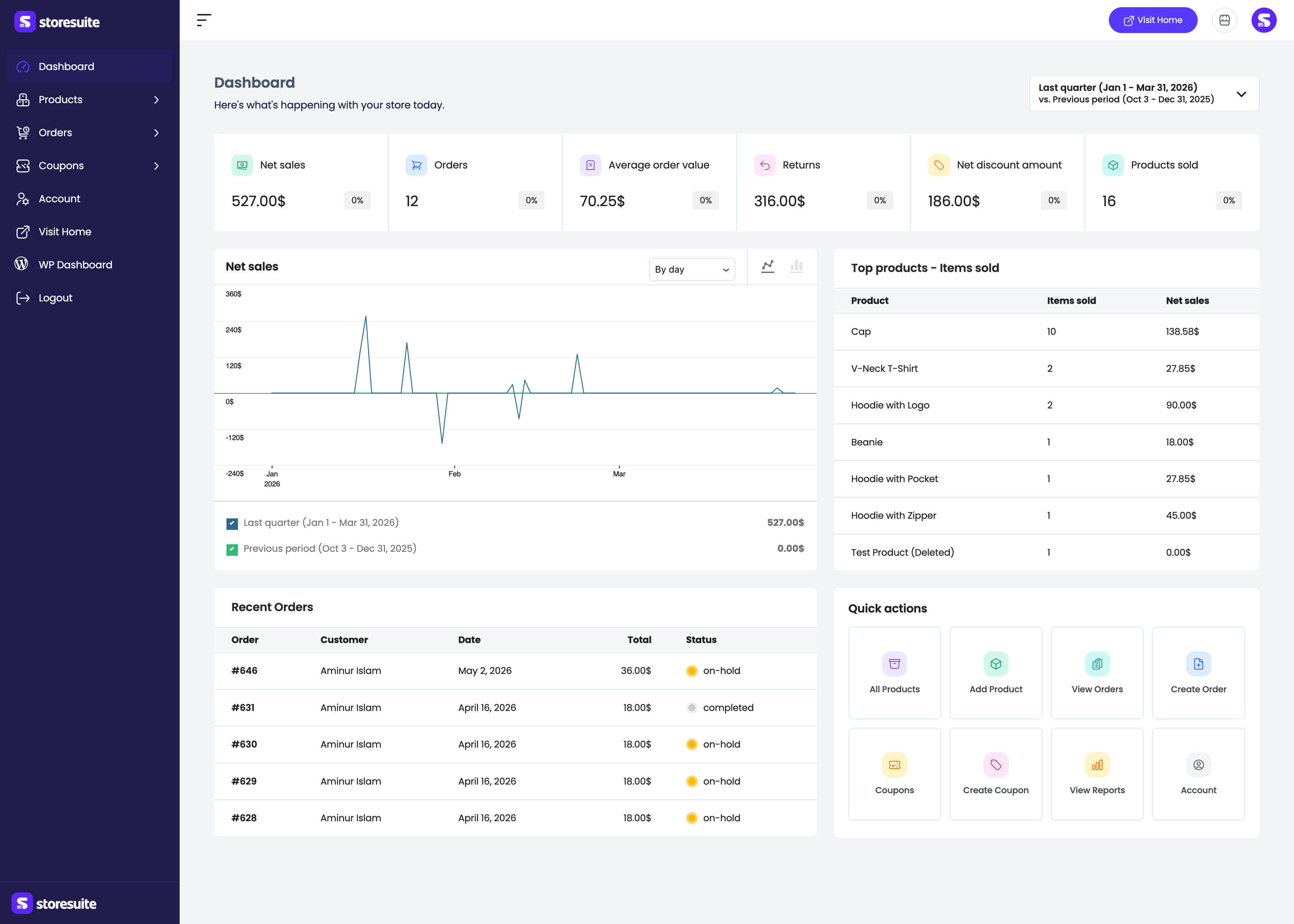
The StoreSuite dashboard is the page that holds the [storesuite_dashboard]
shortcode. Any logged-in user with the manage_woocommerce capability -
typically Administrators and Shop Managers - can open it.
The top bar
Two controls sit in the header of every dashboard page:
- A bell that badges new orders, customer registrations, and product reviews as they happen - see Notifications.
- A sun / moon button that flips the dashboard between light and dark, saved per user - see Dark mode.
Pick your time window
Every number on the page answers “how are we doing compared to before?” The date range picker at the top right decides what “before” means. The dashboard opens on today vs. the previous day; switch to any WooCommerce range (week to date, last month, last quarter, year to date, or a custom range) and compare against the previous period or the previous year.
Change the range once and the stats, chart, leaderboard, and recent orders all follow.
Performance stats
Six stat cards run across the top, each with a percentage badge against your comparison period:
| Stat | What it measures |
|---|---|
| Net sales | Revenue after refunds and discounts |
| Orders | Order count for the period |
| Average order value | Typical purchase size |
| Returns | Refunded value |
| Net discount amount | What coupons and discounts cost you |
| Products sold | Units sold |
Net sales chart
The chart plots your current period against the comparison period, with both totals in the legend beneath it. Group the data by day, week, or month, and switch between line and bar rendering with the icons at the top right. Hover any point for exact figures.
Top products
The Top products – Items sold leaderboard ranks best sellers for the selected period with items sold and the net sales each brought in. Product links open the matching Analytics report rather than wp-admin.
Recent orders
The five latest orders - number, customer, date, total, and a colored status badge. Order numbers link straight to the StoreSuite order details page.
Quick actions
One-click shortcuts to the things you do most: All Products, Add Product, View Orders, Create Order, Coupons, Create Coupon, View Reports, and Account.
Access control
The dashboard and every sub-page are gated by the WooCommerce
manage_woocommerce capability - visitors without it are redirected away, so
the dashboard page is safe to publish anywhere on your site.
Sidebar
Categories, Brands, Tags, and Attributes are nested under Products; the Analytics reports are nested under Analytics. The sidebar collapses to an icon-only rail, and your preference is remembered in the browser.